Introduction
Setting up the General Project Information is a key step in preparing your project for visibility and credibility. This includes adding up your website, social links, and analytics. Providing this information not only improves discoverability but also builds trust with your community.
This article guides you through to complete your setup and get your project sale-ready.
Prior Knowledge
Before you begin creating your Core Sale, make sure you are familiar with:
-
What is a Core?
Explore the different types of cores, their roles in validating transactions, and how they contribute to the security and operation of blockchain ecosystems.
-
LFG Core Sales Program
Learn how the LFG Core Sale Program helps projects achieve sustainable funding, build decentralized infrastructure, and engage their communities.
General Project Information
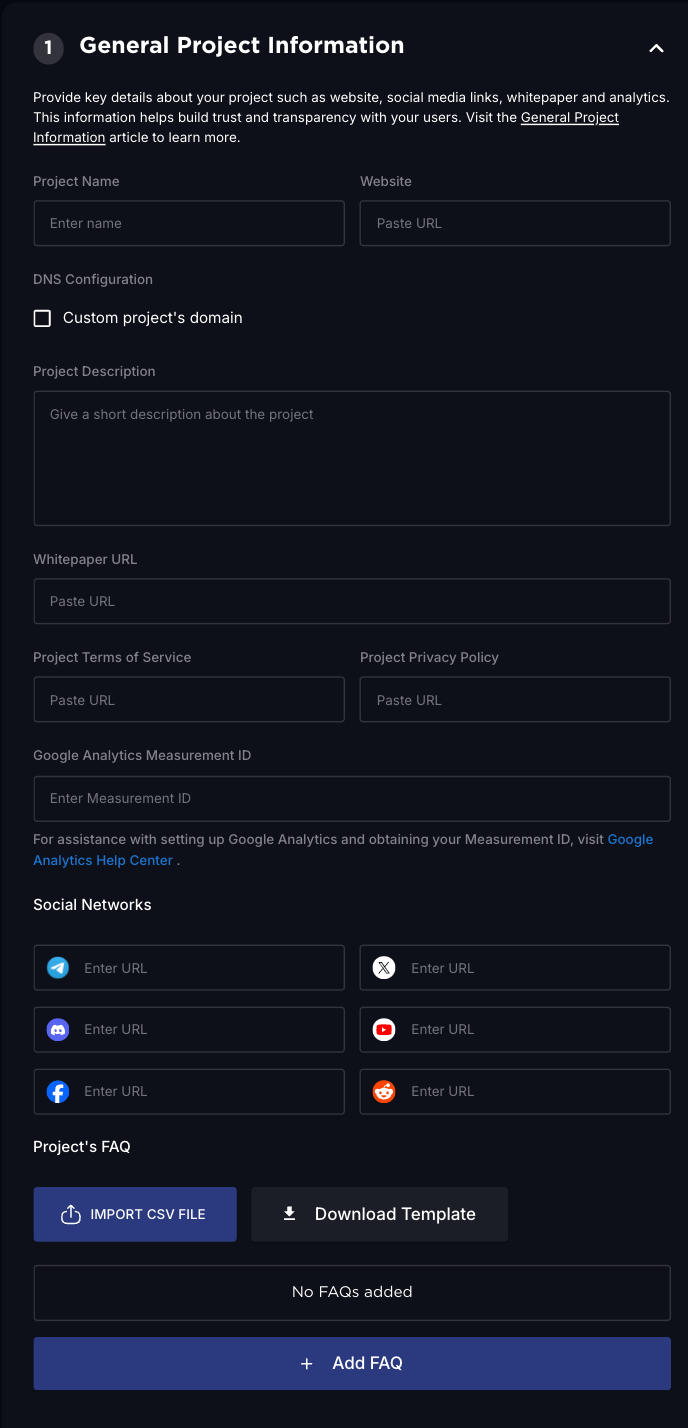
Project Identity
Define the public facing details of your project, including its name, description, and website.
| Field | Description |
| Project Name | The name that will be publicly displayed on your project page. |
| Website | Link to your official site or landing page. |
| Description | A short paragraph explaining what your project does and why it matters. |
DNS Configuration
Choose how your project is accessed, either with a LFG subdomain or branded custom domain.
| Option | Example | Description |
| Custom Domain | node.project.com | Use your own branded domain. Great for established brands. |
| LFG Subdomain | launchpad.lfg.inc | Use a default LFG hosted subdomain. Quick and easy for early-stage projects. |
Supporting Documents
Link to your whitepaper, terms of service, and privacy policy to build trust and ensure compliance.
| Field | Purpose |
| Whitepaper URL | Links to your whitepaper or litepaper explaining your mission, vision, and tokenomics. |
| Terms of Service | Required legal document outlining usage rules for your project. |
| Privacy Policy | Required legal document explaining how user data is handled and protected. |
These documents are publicly visible and help users verify your legitimacy.
Google Analytics Setup
Track traffic, engagement, and gain insights with Google Analytics.
| Field | Description |
| Google Analytics ID | Add your Measurement ID to enable performance tracking for your project page and dashboard. |
Social Media Presence
Grow and connect your community by adding links to your verified social accounts.
You can attach links to the following supported platforms:
- Telegram
- X
- Discord
- YouTube
These will appear on your project’s page to help build social proof and engagement.
Project FAQ
Help users get quick answers and understand your project better.
| Field | Description |
| Project FAQ | Add a custom FAQ to address common questions and educate users about your project. |
Why It Matters
Providing accurate, complete General Project Information ensures that:
- Your project is taken seriously by the community and potential partners
- Users can verify your identity and intentions
- You reduce friction in onboarding and conversion
These fields are foundational and have a direct impact on trust, growth, and discoverability.
Need Help?
If you need help setting this up, don’t hesitate to reach out on LFG Discord. Our team and community are there to support you every step of the way.
Thanks for the feedback.